PostcueJoin the beta

In TestFlight beta for iPhone

Your AI schedules it.Your phone cues it.You post it.

A posting reminder for people who run several social accounts. When a post is due, the frames are in Photos and the caption is copied.

How a cue works

From a line in a chat to a post on your feed, with you in charge of the last step.

  1. A terminal runs create_post for the launch carousel, and it appears in the Friday queue at 21:00.

    Plan it from your desk

    Ask your AI assistant to schedule the post, with the frames straight from your files.

  2. The Postcue icon above a notification: launch carousel is ready, 8 frames and the caption for Instagram.

    Get the cue

    At the due time your phone gets a push for that post, whichever workspace it belongs to.

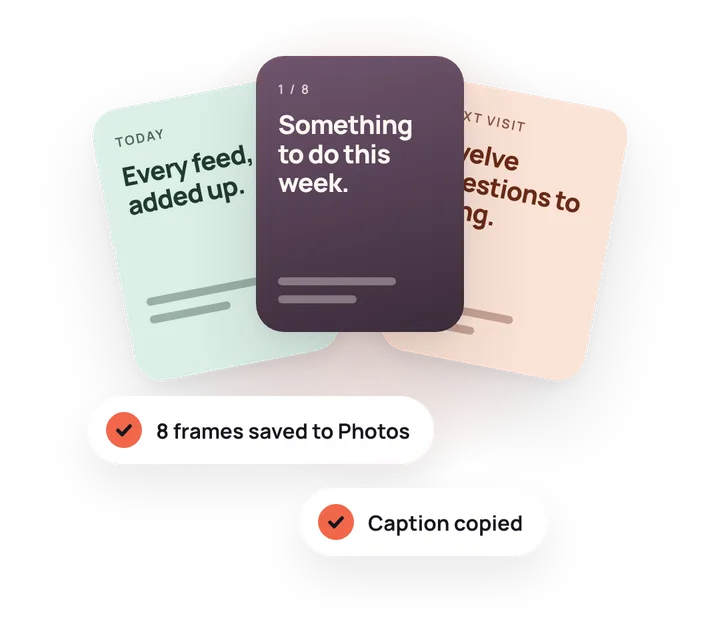
  3. Three carousel frames fanned out, with the labels 8 frames saved to Photos and Caption copied.

    Ready in a few taps

    Every frame goes to Photos in order and the caption to your clipboard.

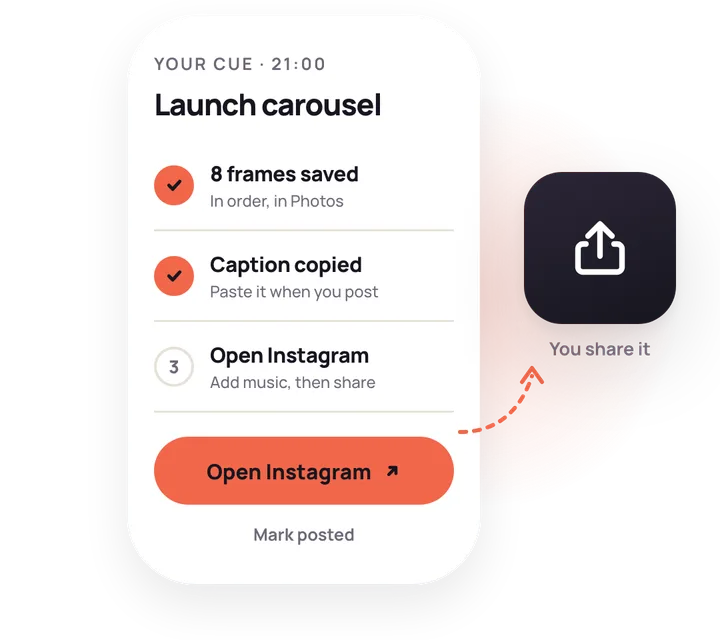
  4. The cue screen with frames saved and caption copied, and an Open Instagram button leading to the share icon.

    Post it yourself

    Postcue opens the app. Add the music and the last look, post, then mark it posted.

Built for AI assistants

Tell your assistant about your brands.

It sets up Postcue and fills the queue. The Postcue MCP server gives Claude, Cursor or any MCP client nine tools: it can create your workspaces and accounts, upload frames from your disk in order, schedule cues and tell you which account you've neglected.

Set up

  • create_workspaceA workspace and its accounts in one call, so an assistant can set up a new user end to end.
  • add_channelAdds an account to a workspace.
  • set_weekly_goalSets how often an account should post each week.
  • list_workspacesWorkspaces, time zones, cadence rules and accounts.

Schedule

  • create_postUploads local frames in order, schedules the cue, warns if the cadence rule breaks.
  • update_postMoves a post or changes its caption or frames before the cue.
  • cancel_postRemoves a post that hasn't been cued yet, files included.
  • list_postsThe queue or the history, for one workspace or all.

Check in

  • get_rhythmHow long each account has been quiet and how it tracks its goal.

› I run BabyPath (@babypath.ai on Instagram and TikTok) and ToDev on LinkedIn. Set me up in Postcue, Athens time.

postcue · create_workspace

name
BabyPath
accounts
instagram @babypath.ai, tiktok @babypath.ai

✓ created

postcue · create_workspace

name
ToDev
accounts
linkedin ToDev

✓ created

Done. Two workspaces and three accounts, on Athens time.

› Which account have I neglected? Plan something for it.

postcue · get_rhythm

todev/linkedin: slipping, posted 12 days ago, goal 2 a week

ToDev on LinkedIn has slipped. I've drafted the Signal Forms article from ./posts/signal-forms for Saturday 9:00. Schedule it?

An example session: the assistant creates two workspaces with their accounts, checks the posting rhythm and proposes a post for the account that has gone slow.

Set it up once

  1. In the app, open Settings, then AI assistant, and tap Create a token.
  2. The app copies a ready Claude Code command or MCP config, with your values filled in. Paste it into your assistant.
  3. Tell it about your brands. It sets up the workspaces and accounts, then fills the queue. Nothing goes live until you post it.

With a token: Claude Code, Claude Desktop, Cursor and any MCP client that runs local servers.

As a connector: ChatGPT, Grok and Claude.ai. Add Postcue's MCP address as a custom connector and sign in with your email code.

Claude Code
claude mcp add postcue \
  --env POSTCUE_API_URL=https://your-postcue-api-url \
  --env POSTCUE_TOKEN_FILE=$HOME/.config/postcue/token \
  -- node /path/to/postcue-mcp/dist/index.js
Cursor, Claude Desktop and other clients
{
  "mcpServers": {
    "postcue": {
      "command": "node",
      "args": ["/path/to/postcue-mcp/dist/index.js"],
      "env": {
        "POSTCUE_API_URL": "https://your-postcue-api-url",
        "POSTCUE_TOKEN_FILE": "/Users/you/.config/postcue/token"
      }
    }
  }
}

Every account, one queue.

A workspace per brand, a channel per account. Your app, your side project and your own handle sit side by side, each in its own colour.

All workspaces, in one list

Every cue from every brand, by day, with the account on each post. Filter by account, or hide a workspace to keep it out of the combined queue.

My cues All workspaces

  • 21:00FriLaunch carouselIG@babypath.ai · 8 framesCue ready
  • 09:00SatSignal Forms articleinToDev · text post
  • 10:00SunSignal Forms reelIG@dimeloper · reel
  • 19:30TueA place for every milestoneTT@babypath.ai · photo post
  • 12:00WedWeekly picksB@todev · thread

Ten networks, any number of accounts

Create workspaces and add accounts in the app, or let your assistant do it.

  • IG
  • TT
  • X
  • @
  • B
  • in
  • f
  • YT
  • P
  • r

A cadence rule per workspace

Set the days between feed posts. Stories don't count.

BabyPath has another feed post tomorrow. Your rule is one day between feed posts.

A history of what went out

Posted or skipped, with the time and the link to the live post.

  • Cue done · 21:04 · IG @babypath.aiOpen live post
  • Skipped · TT @dimeloper

Your frames stay private

Frames upload from your disk, never through a public link. The app opens them with signed links that expire after ten minutes. Sign in with a code sent to your email, no password.

See which account went quiet.

The Rhythm tab lists every account, quietest first, with eight weeks of posts and an optional weekly goal. No account slides into a silent month without you seeing it.

Rhythm

Quietest first, last 8 weeks

  • TT@dimeloperNo weekly goalGone quietQuiet for 5 weeks
  • inToDevGoal: 2 a weekSlippingPosted 12 days ago
  • P@babypath.aiNo weekly goalNewPosted 3 days ago
  • IG@babypath.aiGoal: 3 a weekSteadyPosted 2 days ago
Example data. The dashed line is the weekly goal, measured over the last four weeks.
The Postcue cue screen for Meet BabyPath at 21:00: 8 frames saved, caption copied, and an Open Instagram button, with Mark posted below.

Postcue never posts for you.

It reminds you, hands over the frames and the caption, and opens the app. You always make the last tap.

  • The music is yours to pick

    Trending audio, carousel music, stickers and tags go on in the platform's app. Meta's publishing API can't add music to a carousel anyway.

  • No API access to lose

    Postcue never touches a platform's API. There is no app review, no API plan and no connection that a platform can revoke.

  • A post like any other

    It goes out from the official app, by you, with no third-party publisher in between.

Questions

Something else? Write to hello@getpostcue.com.

Does Postcue post for me?

No, and it never will. At the time you set, it sends a cue, saves the frames to Photos, copies the caption and opens the platform's app. You post it there yourself, then mark it posted.

Which AI assistants can schedule posts?

Claude Code, Claude Desktop, Cursor and other MCP clients connect with a token from the app. ChatGPT, Grok and Claude.ai connect as a custom connector: add Postcue's MCP address and sign in with the same email code as the app.

Do I need an AI assistant to use it?

For creating posts, yes, today. You can make workspaces and add accounts in the app, but posts come in through the MCP server, from Claude, Cursor or another MCP client. The app is where the cues land and where you post from.

How do I connect my assistant?

In the app, open Settings, then AI assistant, and tap Create a token. Postcue copies a ready Claude Code command or MCP config with your details filled in. Paste it into your assistant.

Which platforms does it work with?

Instagram, TikTok, X, Threads, Bluesky, LinkedIn, Facebook, YouTube, Pinterest and Reddit. Add as many accounts per network as you run; each post shows its network and handle.

Is there an Android app?

Not yet. Postcue is iPhone first and in TestFlight beta now. An Android build comes after the iOS release.

Where do my frames live?

In private storage. The MCP server uploads them from your disk, so they never need a public link. The app shows them through signed links that expire after ten minutes.

How do I sign in?

With your email. Postcue sends a six-digit code and a link. There is no password to remember.

What does it cost?

Pricing isn't decided yet. Joining the TestFlight beta costs nothing.

Your posts, on cue.

Postcue is in TestFlight beta for iPhone. Ask for an invite and you'll get the TestFlight link.

Join the beta